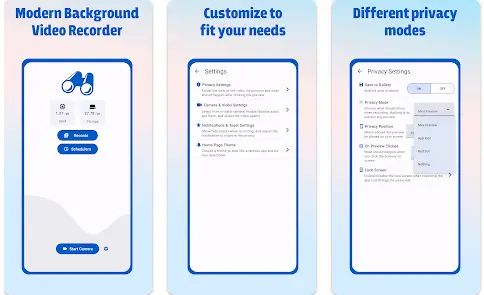
XS Camera APK is an Android camera application designed for users who want more flexibility than a standard smartphone camera. Along with normal video recording, the app focuses on features such as background recording, private video storage, different recording qualities, scheduling, camera controls, and additional privacy options.
In this guide, we will explain XS Camera APK, its features, benefits, recording options, privacy considerations, storage requirements, common problems, and how users can make better use of the application.
What Is XS Camera APK?
XS Camera is an Android video-recording application that provides additional controls for capturing videos. It is designed for users who want to customize their recording experience instead of relying only on the default camera application.
The application can be useful for personal video recording, documentation, tutorials, travel content, home projects, and other legitimate recording purposes.
One of its main attractions is its focus on background video recording and privacy-oriented features. However, users should always respect local privacy laws and obtain consent when recording other people where required.
Main Features of XS Camera APK
Background Video Recording
One of the most notable features is background-style video recording.
This allows users to continue recording while the camera interface is minimized or reduced. Such functionality can be convenient when you need to record something without keeping a large camera preview on the screen.
However, this feature should be used responsibly. It should never be used to secretly record people in situations where recording is illegal or violates their privacy.
Multiple Video Quality Options
XS Camera provides different video-quality settings so users can choose the option that fits their needs.
Depending on device support, users may be able to choose between:
- UHD
- FHD
- HD
- SD
Higher resolution produces more detailed video but also requires more storage space. For longer recordings, a lower resolution may be more practical.
Front and Rear Camera
The application supports both the front and rear cameras.
The rear camera can be useful for general video recording, while the front camera is suitable for selfies, personal videos, tutorials, and video content.
The available camera features ultimately depend on the hardware of your smartphone.
Different Recording Modes
XS Camera provides different recording-interface options, allowing users to customize how the camera operates.
These can include preview-based and reduced-interface recording modes.
This flexibility can make the application more convenient for different recording situations.
Audio Control
Audio recording is an important part of video recording.
XS Camera provides options related to audio capture, allowing users to configure recording according to their needs.
Before recording an important video, it is recommended to make a short test to confirm that the microphone is working correctly.
Flash Control
Flash settings can help users record in darker environments.
However, continuous flash use can increase battery consumption and may not always produce the best video quality.
For better results, natural or external lighting is often preferable when available.
Zoom Function
The zoom feature allows users to change the camera framing while recording.
Keep in mind that digital zoom can reduce image quality at higher levels. The final result depends on your smartphone’s camera hardware.
Private Video Storage
Privacy is an important feature for users who record personal content.
XS Camera can provide options for keeping recordings separate from the normal gallery.
Private storage can help prevent personal videos from appearing alongside ordinary photos and videos.
For additional protection, users should also secure their phone with a strong password, PIN, or biometric authentication.
App Lock
An app-lock feature can provide an additional layer of protection.
This can be useful if other people occasionally use your smartphone and you don’t want them to open your camera application or access private recordings.
Scheduled Recording
Another useful feature is scheduled recording.
Instead of manually starting the camera at a particular moment, users can configure a recording schedule where supported.
This can be useful for personal documentation and other legitimate recording tasks.
Hands-Free Activation
Some versions of XS Camera provide sound-based activation options such as whistle or clap detection.
This allows users to trigger certain functions without directly touching the screen.
The reliability of this feature can depend on surrounding noise and microphone sensitivity.
Benefits of XS Camera APK
Advanced Camera Controls
The application provides more recording options than many basic camera apps.
Users can adjust video quality, recording modes, camera selection, audio, and other settings.
Privacy-Focused Recording
Private storage and app-lock features can help users better control access to personal recordings.
Useful for Long-Term Recording
Different resolution options allow users to choose between video quality and storage consumption.
This can be especially useful when recording for extended periods.
Convenient Background Recording
Background-style recording can be convenient when a traditional camera preview is unnecessary.
Flexible Camera Selection
The ability to switch between front and rear cameras provides more flexibility.
XS Camera for Personal Recording
There are many legitimate ways to use XS Camera.
For example, users can record:
- Travel videos
- Educational demonstrations
- DIY projects
- Personal memories
- Tutorials
- Outdoor activities
- Product demonstrations
- Creative video content
Its additional controls can make it suitable for users who want more flexibility than their standard camera application provides.
XS Camera for Home Security
A smartphone can sometimes be used as a basic personal monitoring camera.
XS Camera’s recording and streaming capabilities may be useful for monitoring your own property or personal space.
For example, a spare Android smartphone could potentially be positioned in an appropriate location to monitor an area you own.
However, users must respect privacy regulations and should not use a camera to monitor people without proper authorization.
For serious security requirements, dedicated home security cameras are generally more appropriate because they are designed for continuous operation.
How to Use XS Camera APK
Using the application is generally straightforward.
Step 1: Install XS Camera
Install a legitimate version of the application on a compatible Android device.
Avoid unknown modified APK files that claim to provide premium features.
Step 2: Open the Application
Launch XS Camera and review the available settings.
Step 3: Grant Required Permissions
The application may request camera and microphone permissions.
Review each permission before granting access.
Step 4: Select the Camera
Choose the front or rear camera according to your recording requirements.
Step 5: Select Video Quality
Choose UHD, FHD, HD, or SD depending on your smartphone and storage capacity.
Step 6: Configure Recording Options
Adjust audio, flash, zoom, preview, and other available settings.
Step 7: Start Recording
Start the recording using the available control.
Step 8: Save the Video
After completing the recording, save the file in the appropriate location.
If the video contains sensitive information, consider keeping it in protected storage.
XS Camera and Storage Space
Video recording can consume a significant amount of storage.
Higher-quality video requires more storage than standard-definition recording.
For example, long UHD recordings can occupy a large amount of space.
To manage storage efficiently:
- Delete unnecessary videos
- Transfer important recordings to secure storage
- Use lower resolution for long recordings
- Regularly check available storage
- Avoid keeping duplicate files
If your phone has limited storage, selecting HD or SD can be a practical option for lengthy recordings.
Battery Usage
Camera recording can consume considerable battery power.
Background recording, high-resolution video, screen activity, and flash can increase battery consumption.
For longer recording sessions:
- Start with a sufficiently charged battery
- Reduce unnecessary screen brightness
- Use appropriate video quality
- Avoid excessive flash
- Keep the phone adequately ventilated
Avoid covering the phone with materials that could cause overheating during long recordings.
Privacy and Security
Camera applications naturally require access to sensitive hardware such as the camera and microphone.
For this reason, users should pay attention to application permissions.
Before using any camera application, check:
- Camera permission
- Microphone permission
- Storage access
- Network access
- Privacy policy
- Data collection information
Only grant permissions that are necessary for the features you actually use.
Is XS Camera Safe?
The safety of any APK depends partly on where it comes from.
A legitimate application obtained from a trustworthy source is generally preferable to a modified APK downloaded from an unknown website.
Users should be especially cautious about versions advertised as:
- XS Camera MOD APK
- XS Camera Premium APK
- XS Camera Pro APK
- XS Camera Unlocked APK
- XS Camera Unlimited APK
Modified packages can potentially contain unwanted code or altered functionality.
Never assume that an APK is safe simply because a website describes it as “100% secure.”
Avoid Fake APK Versions
Some websites use popular keywords to attract downloads and may distribute modified packages.
A suspicious APK might request permissions that don’t make sense for a camera application.
It can also contain unwanted advertisements, tracking components, or other potentially harmful modifications.
Before installing any APK, consider its source and permissions carefully.
Common XS Camera Problems
Camera Does Not Start
If the camera does not start, check whether camera permission has been enabled.
Another application may also be using the camera.
Restarting the phone can sometimes resolve temporary camera conflicts.
Video Has No Sound
Check microphone permissions and make sure audio recording is enabled.
If you are using Bluetooth accessories, test the recording without them to determine whether they are affecting the audio source.
Recording Stops Automatically
Android battery optimization may stop applications running in the background.
Check your phone’s battery-management settings if recordings repeatedly stop.
Poor Video Quality
Clean the camera lens and make sure there is sufficient lighting.
You can also select a higher-quality recording setting if your device supports it.
Phone Gets Hot
Camera recording can generate heat, especially during high-resolution recording.
Stop recording if your device becomes unusually hot and allow it to cool down.
Storage Becomes Full
Long video recordings can quickly fill your phone’s storage.
Delete unnecessary files or move important videos to secure storage.
How to Improve XS Camera Recording Quality
Use Good Lighting
Lighting has a major impact on video quality.
Whenever possible, record in a well-lit environment.
Keep the Camera Lens Clean
Dust and fingerprints can make footage look blurry.
Clean the lens gently with an appropriate microfiber cloth.
Keep the Phone Stable
A tripod or stable surface can reduce unwanted camera movement.
Choose the Right Resolution
Use high resolution when detail is important and lower resolution when storage efficiency matters.
Test Audio
Always make a short test recording before an important project.
XS Camera for Content Creators
Content creators can use advanced camera applications for various purposes.
The application may be useful for:
- Short videos
- Tutorials
- Demonstrations
- Product videos
- Educational content
- Personal projects
However, professional creators may require advanced features such as manual exposure, professional color controls, external microphone support, stabilization, and advanced video codecs.
In such cases, a dedicated professional camera application may be more appropriate.
XS Camera vs Default Camera
The default smartphone camera is usually optimized for quick photography and video recording.
XS Camera focuses more on customization and privacy-oriented recording.
Default Camera App
- Simple interface
- Fast access
- Optimized for the device
- Standard photo and video features
XS Camera
- Multiple recording modes
- Background-style recording
- Private storage
- App lock
- Scheduling
- Hands-free options
- Multiple video-quality settings
- Additional recording controls
If you only need basic photos and videos, the default camera may be enough. If you want additional recording controls, XS Camera can be worth considering.
Responsible Use of Camera Applications
Camera applications should always be used responsibly.
Do not use background or minimized recording to secretly monitor people in private situations.
Before recording another person, consider:
- Whether they know about the recording
- Whether consent is legally required
- Whether the location has recording restrictions
- How the recording will be stored
- Who will have access to it
This is especially important for workplaces, schools, private meetings, and sensitive environments.
Frequently Asked Questions
What is XS Camera APK?
XS Camera APK is an Android camera and video-recording application designed to provide additional recording controls and privacy-oriented features.
Can XS Camera record videos in the background?
The application is designed to support background-style recording modes. However, users should use these features only for lawful and responsible purposes.
Does XS Camera support HD recording?
Yes, the application provides multiple video-quality options depending on device compatibility.
Can I use the front camera?
Yes, front and rear camera options are available on supported devices.
Does XS Camera use a lot of storage?
High-resolution video can consume substantial storage. UHD and FHD recordings generally require more space than HD or SD recordings.
Can XS Camera record audio?
Audio recording is supported where the device and application configuration allow it.
Does XS Camera have an app lock?
The application includes privacy-oriented features such as app locking on supported versions.
Can I schedule a recording?
Scheduled recording is one of the features associated with XS Camera, although exact functionality can depend on the version and Android device.
Is XS Camera MOD APK safe?
You should be cautious with modified APK files from unknown sources. They can potentially contain unwanted modifications or security risks.
Can XS Camera be used as a security camera?
It may be useful for basic monitoring of your own space where appropriate, but dedicated security cameras are generally better suited for continuous home surveillance.
Final Verdict
XS Camera APK is an Android recording application aimed at users who want more flexibility than a standard camera app provides. Its combination of background video recording, multiple video-quality options, front and rear camera support, private storage, app lock, scheduling, audio controls, and additional recording features makes it an interesting option for personal video recording.
The application can be useful for travel videos, tutorials, personal projects, documentation, and other legitimate recording activities. Users can also benefit from choosing different video resolutions depending on their storage capacity and recording requirements.
Privacy should remain a major consideration. Features that make background recording convenient should never be used to secretly monitor or record people in situations where doing so is unlawful or violates their privacy.
Users should also avoid suspicious XS Camera MOD APK files and carefully review application permissions before installation. Protecting your Android device with a strong password and keeping sensitive recordings secure can provide additional protection.